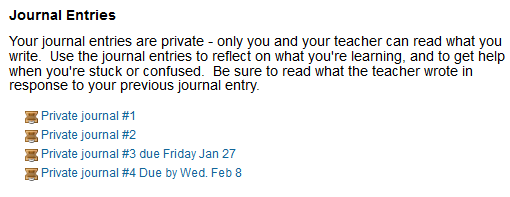
When students are engaged in an extensive research project, I want them to have a way to converse privately with the teacher, to reflect about what they’re learning, and to have an opportunity to get extra help. I called these Private Journals to reinforce their private nature. In the past, I’ve used separate threads in a single discussion forum for this task, but that didn’t provide much privacy. Once I learned how to use the Online Text Assignment in Moodle, I switched to this instead. See: http://adventuresonlineteaching.blogspot.com/2011/12/private-teacher-student-conversation.html
I’ve always thought providing this private communication channel was a good idea. But I’ve found evidence that it’s even better than I thought.
After we finished the project, I asked students to tell me what worked well for them and what didn’t work; they answered free-form, not from a list. Many of them spontaneously said they liked the Private Journals.
I wasn’t even sure they were looking at my replies in the Private Journals, but then I checked out the Participation Report (under Administration >Reports) where I could see how many times students edited or viewed the entries. (Thanks to Colin Matheson in the Moodle Mayhem Listserv http://groups.google.com/group/moodlemayhem?hl=en&pli=1 for this great idea). Students generally wrote their entry without further rewrites, but many went back to either 1) see if I had replied yet, or 2) read my reply several times. How’s that for evidence that teachers matter?
I really enjoy this part of the project, as it allows me to give undivided individual attention.
Clearly students want this special attention. I could suggest resources or search strategies, or give attaboys, or listen to some new cool fact they had learned, or just share their enthusiasm for what they were learning. It was like having a mini-tutoring session with each student – without interruptions as well as with time for me to think.
I had been afraid that I wouldn’t be able to get the conversation going when each Private Forum post was separate from previous entries; in each, the student speaks and then the teacher speaks. This was more disjointed than using a separate thread in a discussion forum for each student. But we still managed.
I also learned to add the due date to the title of the different posts so that students could distinguish them. (I had originally just posted four Private Journals for students to post to, but they found this confusing, and were posting in random Private Journals – lesson learned).
As in the past, when I’ve used this tool (along with making sure students have found a subject they really want to research,) the result has been well-researched and well-written reports from a great variety of learners.
I always thought this was a useful tool – I just didn’t know how much.
Showing posts with label privacy. Show all posts
Saturday, February 11, 2012
Tuesday, November 22, 2011
Moodle eAssessment Course
I’m taking a fabulous ecourse, eAssessment in Moodle at LearnNowBC http://www.learnnowbc.ca/educators/MoodleMeets/default.aspx, one of many courses offered.
The course is well-organized and very hands-on, and has many opportunities for sharing ideas as well as learning unexpected things.
For instance, I’ve learned how to set up groups (one group for each student) so that I can set up a forum that can be completely private for each student – that way when I want to have an extended private conversation with each student about their work, then I can. Without using groups this way, every student has a separate thread, but the conversations could be potentially read by any other student, which can make students uncomfortable. The forum is set up with separate groups, and only viewable by group members (see illustration).
A tip of the hat to moderator David LeBlanc who has shared so generously of his knowledge and experience.
The course is well-organized and very hands-on, and has many opportunities for sharing ideas as well as learning unexpected things.
For instance, I’ve learned how to set up groups (one group for each student) so that I can set up a forum that can be completely private for each student – that way when I want to have an extended private conversation with each student about their work, then I can. Without using groups this way, every student has a separate thread, but the conversations could be potentially read by any other student, which can make students uncomfortable. The forum is set up with separate groups, and only viewable by group members (see illustration).
A tip of the hat to moderator David LeBlanc who has shared so generously of his knowledge and experience.
Saturday, June 11, 2011
Sample Moodle course
Sometimes people ask me what my Moodle courses look like, or what any Moodle course looks like, or how to do something in Moodle. I’d love to let these people look at my active courses, but that violates the privacy of my students, all minors, so it can’t be done.
Recently, I took my most active course, archived it without student information, then gave it a new name when restoring it. This way, I have the entire course but without any student information.
If you’d like to take a look at it for ideas, you’re welcome. Here’s the full URL: https://stbernard.globalclassroom.us/cirrus/course/view.php?id=11 and a shortened one: http://tinyurl.com/3wzynwp
This is a blended course, so the online piece and the face-to-face piece complement each other. I am making a lot of changes this summer, but thought other teachers would be interested. (I especially want to change the default font size so I don’t have to keep using labels to make the contents easier to read.)
Unlike the way the course appears to students, all the units show, and all parts of a unit show. In “real life” only some of the activities for a unit are revealed at a time. Also, for students, only a few units are available at any one time, and directions are always the first thing they see, as in the example I’ve given. Some units (vocabulary) are always available, but they are always placed below the unit we’re working on at that point, sort of in the background.
You are welcome to do the usual teacher thing – borrow, borrow, borrow.
Recently, I took my most active course, archived it without student information, then gave it a new name when restoring it. This way, I have the entire course but without any student information.
If you’d like to take a look at it for ideas, you’re welcome. Here’s the full URL: https://stbernard.globalclassroom.us/cirrus/course/view.php?id=11 and a shortened one: http://tinyurl.com/3wzynwp
This is a blended course, so the online piece and the face-to-face piece complement each other. I am making a lot of changes this summer, but thought other teachers would be interested. (I especially want to change the default font size so I don’t have to keep using labels to make the contents easier to read.)
Unlike the way the course appears to students, all the units show, and all parts of a unit show. In “real life” only some of the activities for a unit are revealed at a time. Also, for students, only a few units are available at any one time, and directions are always the first thing they see, as in the example I’ve given. Some units (vocabulary) are always available, but they are always placed below the unit we’re working on at that point, sort of in the background.
You are welcome to do the usual teacher thing – borrow, borrow, borrow.
Subscribe to:
Posts (Atom)