I buy hundreds of dollars of books every year from Amazon – used, new, Kindle. For me, for family, for school. Recently, I needed some leveled readers right away. As part of my regular English language arts class, I’m working with ELLs (English Language Learners) who need help reading English, and need materials that are high interest but have a simpler and gradually more difficult vocabulary; leveled readers fit the bill exactly.
I ordered several of these books – all listed by Amazon as “in stock.” Ordinarily, I use the “free shipping if the order is $25 or more,” but this time I wanted the books ASAP.
So I decided to spring for 2-day shipping – which cost almost as much as the books. But my students have been totally frustrated trying to read age-appropriate materials published for native English speakers that just have too much new vocabulary. I wanted my students to have something good to read. After all, when you select shipping speed with Amazon, bold letters
next to 2-day shipping tell you you'll get your items on a date that's 2
days after today; they give the actual date. (See example, right.)
But only one book out of 6 ordered came (in 3 days). Then a second came a day later. Then nothing. Eight days after the order, I received an email that the last 4 books just were shipped. With 2-day shipping charges.
According to Amazon’s friendly and courteous support email, 2-day shipping means it takes 2-days from when they actually ship to when it gets to you; Amazon has multiple fulfillment centers, and items aren’t all necessarily shipped right away. More than half the order, listed as "in stock," wasn't even shipped for more than a week.
Amazon's policy certainly doesn’t mean Amazon ships the day you order and you’ll get your order in two days . Even though that's what you see when you order.
Ironically, I ordered used leveled readers through Amazon and also from http://www.abebooks.com/ at the same time, and virtually all of those have already gotten here. The shipping for used books from Amazon cost me $3.99/book. The shipping from http://www.abebooks.com/ varied, but sometimes was as little as $1.00 per book.
Lesson learned. Don’t waste your money on Amazon’s 2-day shipping because you’re sure not going to get it in two days. Amazon did refund the extra shipping for the books that weren’t even shipped out a week after I made the order. But shouldn't they be more honest about what a customer gets for "2-day shipping?"
Monday, January 16, 2012
Sunday, January 1, 2012
Building Community in the Blended Classroom
Whether online, F2F, or blended/hybrid, to help our students learn, we need to build an effective community. That means learners feel a part of something bigger than themselves, they use bouncing ideas off of each other and working collaboratively to deepen their learning, and they want to take care of each other.

In the F2F classroom, this happens, but shy kids might stay observers, rather than comfortable community members. In small groups and work done in pairs, shyer kids have an easier time, and also get to use social learning to add ideas, possibly challenge their ideas, and work collaboratively. Working with a friend feels safer, but sometimes socializing becomes paramount. Also, if a student has poor social skills – whether in the whole class, small groups, or in pairs – both that student and others have difficulties.
In the purely online classroom, which I have only experienced with adults, the community gets created by effective facilitators build community using discussion forums (particularly where students are required to be active throughout the week) and sometimes small group work. There are still students who don’t like discussion, don’t like group work, who choose to lurk. They may be learning, but they are on the edges of the community.
In the blended classroom – partly F2F and partly online – I feel like we have the best of both words.
We build community in the F2F classroom. But we also build community online. Shy students have an opportunity to work privately; deliberate thinkers get to think as long as they need to before sharing. The playing field (to use an overused metaphor) is leveled, because everybody can participate without needing to have the courage to raise their hand. (See http://adventuresonlineteaching.blogspot.com/2011/05/looking-back-on-our-moodle-year.html).
But in the blended classroom, I’m not limited to posting information or replying to discussion forum posts or uncovering new and interesting resources and activities. I can also talk with students F2F. Kids like to hear the words. And because I can’t count on middle schoolers to go back to a discussion forum to see what I wrote (they tend to consider themselves done once they have posted and replied to other posts), I need to make sure they actually hear from me. I have to say my kids sure like hearing, “Good post!” or “I enjoyed what you wrote last night,” or “Good point!” And dealing with problematic posts is easier to do F2F, where communication isn’t restricted to written words, but can include my tone, gestures, and posture. (See http://adventuresonlineteaching.blogspot.com/2011/02/dealing-with-nastiness.html).
As I’ve written before, the blended classroom seems more cohesive and there is more risk-taking. Many more students raise their hands in the blended F2F classroom because they’ve had success online. And not just from me. There are also the “Gee, I didn’t know you were so smart” comments from peers.
Finally, everybody gets a chance to be successful somewhere. For example, some students have great computer skills but aren’t strong writers – they get to shine when we’re in the computer lab. Middle school is not a time when kids feel confident or successful. And I think the blended classroom lets them find a place to experience success and confidence.
In the F2F classroom, this happens, but shy kids might stay observers, rather than comfortable community members. In small groups and work done in pairs, shyer kids have an easier time, and also get to use social learning to add ideas, possibly challenge their ideas, and work collaboratively. Working with a friend feels safer, but sometimes socializing becomes paramount. Also, if a student has poor social skills – whether in the whole class, small groups, or in pairs – both that student and others have difficulties.
In the purely online classroom, which I have only experienced with adults, the community gets created by effective facilitators build community using discussion forums (particularly where students are required to be active throughout the week) and sometimes small group work. There are still students who don’t like discussion, don’t like group work, who choose to lurk. They may be learning, but they are on the edges of the community.
In the blended classroom – partly F2F and partly online – I feel like we have the best of both words.
We build community in the F2F classroom. But we also build community online. Shy students have an opportunity to work privately; deliberate thinkers get to think as long as they need to before sharing. The playing field (to use an overused metaphor) is leveled, because everybody can participate without needing to have the courage to raise their hand. (See http://adventuresonlineteaching.blogspot.com/2011/05/looking-back-on-our-moodle-year.html).
But in the blended classroom, I’m not limited to posting information or replying to discussion forum posts or uncovering new and interesting resources and activities. I can also talk with students F2F. Kids like to hear the words. And because I can’t count on middle schoolers to go back to a discussion forum to see what I wrote (they tend to consider themselves done once they have posted and replied to other posts), I need to make sure they actually hear from me. I have to say my kids sure like hearing, “Good post!” or “I enjoyed what you wrote last night,” or “Good point!” And dealing with problematic posts is easier to do F2F, where communication isn’t restricted to written words, but can include my tone, gestures, and posture. (See http://adventuresonlineteaching.blogspot.com/2011/02/dealing-with-nastiness.html).
As I’ve written before, the blended classroom seems more cohesive and there is more risk-taking. Many more students raise their hands in the blended F2F classroom because they’ve had success online. And not just from me. There are also the “Gee, I didn’t know you were so smart” comments from peers.
Finally, everybody gets a chance to be successful somewhere. For example, some students have great computer skills but aren’t strong writers – they get to shine when we’re in the computer lab. Middle school is not a time when kids feel confident or successful. And I think the blended classroom lets them find a place to experience success and confidence.
Tuesday, December 13, 2011
Using Hot Potatoes with Moodle
I’ve never used the quiz module in Moodle both because it’s hard to use, and because multiple choice isn’t something I use a lot. As an English teacher, I usually want my students to write.
But I still want to be able to use quiz-type activities, especially for review. So I was delighted to see that my Moodle host, GlobalClassroom, supports Hot Potatoes, which provides matching, multiple-choice, cloze, and similar activities, with very minimal effort on my part.
Here’s how it worked for me.
First, I downloaded Hot Potatoes to my PC, available from the University of Victoria at http://hotpot.uvic.ca/ . It will also work on Mac and Linux.
Then, using the Hot Potatoes program that is now on my desktop, I created a matching exercise to help students review what they know about homophones, with the words on the left and short definitions on the right. Students drag the correct definition to the word and then check their work. You choose the type of quiz and enter the questions next to the correct answers (students will see the answers scrambled). You can use the default directions or add your own. And you can set the number of tries as well as a time limit for each try.
After saving the Hot Potatoes exercise on my PC, I opened Moodle, and clicked on Add an Activity and then on Hot Potatoes Quiz. Then I uploaded the file I just created and voila, there it is.
Today my students practiced with the new quiz in class, some several times until they got it right (or at least better). Some asked, “Can I try this some more at home?” which is just what I want to hear.
I learned to use Hot Potato from the Moodle eAssessment course I took through LearnNowBC http://www.learnnowbc.ca/educators/MoodleMeets/default.aspx.
But I still want to be able to use quiz-type activities, especially for review. So I was delighted to see that my Moodle host, GlobalClassroom, supports Hot Potatoes, which provides matching, multiple-choice, cloze, and similar activities, with very minimal effort on my part.
Here’s how it worked for me.
First, I downloaded Hot Potatoes to my PC, available from the University of Victoria at http://hotpot.uvic.ca/ . It will also work on Mac and Linux.
Then, using the Hot Potatoes program that is now on my desktop, I created a matching exercise to help students review what they know about homophones, with the words on the left and short definitions on the right. Students drag the correct definition to the word and then check their work. You choose the type of quiz and enter the questions next to the correct answers (students will see the answers scrambled). You can use the default directions or add your own. And you can set the number of tries as well as a time limit for each try.
After saving the Hot Potatoes exercise on my PC, I opened Moodle, and clicked on Add an Activity and then on Hot Potatoes Quiz. Then I uploaded the file I just created and voila, there it is.
Today my students practiced with the new quiz in class, some several times until they got it right (or at least better). Some asked, “Can I try this some more at home?” which is just what I want to hear.
I learned to use Hot Potato from the Moodle eAssessment course I took through LearnNowBC http://www.learnnowbc.ca/educators/MoodleMeets/default.aspx.
Sunday, December 11, 2011
Private teacher-student conversation, the Online Text Assignment tool in Moodle
Ever want to have a way for your students to converse with you online that allows the student privacy from their peers? Email seems obvious, but my students don’t check their email. Ever. And I’ve had students “converse” with me via separate threads in a discussion forum (one thread per student). But that’s not private (unless I want to set up each student as a separate group, which is way too much work when one has 100+ students in secondary school).
Happily, Moodle has the Online Text Assignment tool, which allows students to post what they’re thinking and allows me to respond. My students find this to be very like posting to a forum, but they know that only the teacher sees what they write. Since we’re in the midst of student-written and –directed plays, done in small groups, there is a fair amount of tension as some students take the work more seriously than others. It’s useful to provide a private place to vent, as well as a place for students to reflect on the experience. And I get to make suggestions (also private), or address the problem in the F2F class.
It isn’t quite the same “conversation” I’ve had when I had students post to separate forum threads about a research project, but it is more private, which I know students appreciate. I get an email whenever a student posts a reflection. This is similar to emails when a student posts to a forum – except forum posts show in the email, whereas the content of the online text assignment is not included in the email. I like getting the emails especially for students who post early – so I can respond immediately – and for students who post late – so I can still respond.
I'll be using this tool again.
I learned about the Online Text Assignment during the eAssessment in Moodle course I recently took through LearnNowBC http://www.learnnowbc.ca/educators/MoodleMeets/default.aspx. So happy to expand my assessment repetoire.
Happily, Moodle has the Online Text Assignment tool, which allows students to post what they’re thinking and allows me to respond. My students find this to be very like posting to a forum, but they know that only the teacher sees what they write. Since we’re in the midst of student-written and –directed plays, done in small groups, there is a fair amount of tension as some students take the work more seriously than others. It’s useful to provide a private place to vent, as well as a place for students to reflect on the experience. And I get to make suggestions (also private), or address the problem in the F2F class.
It isn’t quite the same “conversation” I’ve had when I had students post to separate forum threads about a research project, but it is more private, which I know students appreciate. I get an email whenever a student posts a reflection. This is similar to emails when a student posts to a forum – except forum posts show in the email, whereas the content of the online text assignment is not included in the email. I like getting the emails especially for students who post early – so I can respond immediately – and for students who post late – so I can still respond.
I'll be using this tool again.
I learned about the Online Text Assignment during the eAssessment in Moodle course I recently took through LearnNowBC http://www.learnnowbc.ca/educators/MoodleMeets/default.aspx. So happy to expand my assessment repetoire.
Tuesday, November 29, 2011
Using the Lesson tool in Moodle
Thanks to the Moodle eAssessment course I took through LearnNowBC I’ve learned how to create a lesson – a highly structured way to take students through activities and a variety of possible assessments.
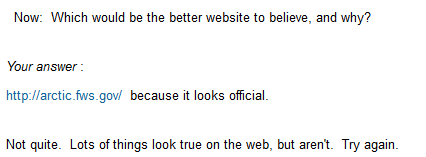
I decided to try creating a lesson for technology in an area where students really blow through the work I give them without really looking at it – evaluating websites. I decided to make Moodle the “bad guy,” remembering that my brother used a computer chess program to teach his kids how to play chess. The computer wouldn’t let them make any invalid moves, so they were forced to follow the rules. I hoped the same thing will happen here.
I set up quite a simple, linear lesson. I start with a PowerPoint which I actually present in class so that we can discuss it, showing students some examples of websites that are less than honest or not very balanced. (If a student missed that class, they can still watch the PowerPoint).
Then I walk the student through an example. Here’s a real website. Look first at who’s the author. I give some examples of where to find the author, then ask a multiple choice question (could also do T/F, short-answer, essay, and a few others) to see if they can identify the author. The wrong answers explain why they’re wrong and return the student to the information and question for another try.
I do the same thing with other facts I want them to evaluate, such as, who links into this website, what links out are there (and are these current and valid), how accurate is this information, and so on. Students must get the right answer before they can go on.
Next, I give students two other websites to evaluate using the same criteria, but without quite as much hand-holding. I use multiple choice to make sure they “get” it again.
Finally, I ask students to evaluate a really biased website. This time they have to write a short essay explaining why / why not they think it is a valid website to use, using evidence from their own evaluation.
Though I’ve gone through a similar process with paper directions, I find that students skip many steps and I have had to spend a lot of time redirecting. Now, Moodle is doing this for me.
The result? A few students blew right through, but I could tell that from their final written assignment. I’ve told them to go back and do the actual work. The rest… got it! Some didn’t get every single part of what I wanted them to learn, but they understood the basic concepts and could articulate their thought process. (We also learned that Lesson doesn't seem to work with Internet Explorer, but works fine with Firefox, and that if you stop a lesson in the middle, Moodle saves your place.)
And I didn’t have to remind kid after kid after kid to look at the details – the program did it for me. I’m sitting here smiling.
I decided to try creating a lesson for technology in an area where students really blow through the work I give them without really looking at it – evaluating websites. I decided to make Moodle the “bad guy,” remembering that my brother used a computer chess program to teach his kids how to play chess. The computer wouldn’t let them make any invalid moves, so they were forced to follow the rules. I hoped the same thing will happen here.
I set up quite a simple, linear lesson. I start with a PowerPoint which I actually present in class so that we can discuss it, showing students some examples of websites that are less than honest or not very balanced. (If a student missed that class, they can still watch the PowerPoint).
Then I walk the student through an example. Here’s a real website. Look first at who’s the author. I give some examples of where to find the author, then ask a multiple choice question (could also do T/F, short-answer, essay, and a few others) to see if they can identify the author. The wrong answers explain why they’re wrong and return the student to the information and question for another try.
I do the same thing with other facts I want them to evaluate, such as, who links into this website, what links out are there (and are these current and valid), how accurate is this information, and so on. Students must get the right answer before they can go on.
Next, I give students two other websites to evaluate using the same criteria, but without quite as much hand-holding. I use multiple choice to make sure they “get” it again.
Finally, I ask students to evaluate a really biased website. This time they have to write a short essay explaining why / why not they think it is a valid website to use, using evidence from their own evaluation.
Though I’ve gone through a similar process with paper directions, I find that students skip many steps and I have had to spend a lot of time redirecting. Now, Moodle is doing this for me.
The result? A few students blew right through, but I could tell that from their final written assignment. I’ve told them to go back and do the actual work. The rest… got it! Some didn’t get every single part of what I wanted them to learn, but they understood the basic concepts and could articulate their thought process. (We also learned that Lesson doesn't seem to work with Internet Explorer, but works fine with Firefox, and that if you stop a lesson in the middle, Moodle saves your place.)
And I didn’t have to remind kid after kid after kid to look at the details – the program did it for me. I’m sitting here smiling.
Tuesday, November 22, 2011
Moodle eAssessment Course
I’m taking a fabulous ecourse, eAssessment in Moodle at LearnNowBC http://www.learnnowbc.ca/educators/MoodleMeets/default.aspx, one of many courses offered.
The course is well-organized and very hands-on, and has many opportunities for sharing ideas as well as learning unexpected things.
For instance, I’ve learned how to set up groups (one group for each student) so that I can set up a forum that can be completely private for each student – that way when I want to have an extended private conversation with each student about their work, then I can. Without using groups this way, every student has a separate thread, but the conversations could be potentially read by any other student, which can make students uncomfortable. The forum is set up with separate groups, and only viewable by group members (see illustration).
A tip of the hat to moderator David LeBlanc who has shared so generously of his knowledge and experience.
The course is well-organized and very hands-on, and has many opportunities for sharing ideas as well as learning unexpected things.
For instance, I’ve learned how to set up groups (one group for each student) so that I can set up a forum that can be completely private for each student – that way when I want to have an extended private conversation with each student about their work, then I can. Without using groups this way, every student has a separate thread, but the conversations could be potentially read by any other student, which can make students uncomfortable. The forum is set up with separate groups, and only viewable by group members (see illustration).
A tip of the hat to moderator David LeBlanc who has shared so generously of his knowledge and experience.
Saturday, November 19, 2011
Sharing what you learn
Last month I had the chance to present at a state computer teachers’ conference about using Moodle for discussions. It was nerve-wracking to plan carefully so that I could be sure that the technology would work right (it did).
I thought I’d have extra time left over, but instead ran out of time just as I was finishing. There were lots of good questions, from concerns that kids can post before teachers can check what they post (yes, they can – just like kids can say inappropriate things in the face-to-face classroom) to "how-to" sorts of questions.
What I didn’t expect: it was fun. It’s a blast to talk about what happens with your students in your classroom, organized in a way that can help other teachers.
I posted resources on Scribd, which meant I didn’t have to drag around a lot of hand-outs. http://www.scribd.com/doc/68072602/Presentation-Resources-CECA-about-Moodle-Discussions
I thought I’d have extra time left over, but instead ran out of time just as I was finishing. There were lots of good questions, from concerns that kids can post before teachers can check what they post (yes, they can – just like kids can say inappropriate things in the face-to-face classroom) to "how-to" sorts of questions.
What I didn’t expect: it was fun. It’s a blast to talk about what happens with your students in your classroom, organized in a way that can help other teachers.
I posted resources on Scribd, which meant I didn’t have to drag around a lot of hand-outs. http://www.scribd.com/doc/68072602/Presentation-Resources-CECA-about-Moodle-Discussions
Subscribe to:
Posts (Atom)